Day 2 - Users and licenses
Read the lesson, work through the screenshots, complete the assignment, and then use the answer key as a self-check.
Learning goals
By the end of Day 2, you should be able to:
- locate a user account in Microsoft 365 and Entra
- explain the difference between a user object, a mailbox, and a license assignment
- describe where user creation and license assignment happen
- inspect a user and prepare a clean note for escalation when changes are needed
Why this matters
A huge percentage of routine Microsoft 365 work starts with users and licenses. Before anyone troubleshoots Teams, email, or SharePoint, they usually need to know:
- does the user exist?
- does the user have the right license?
- do the right apps and services appear assigned?
Start with the user record
In the Microsoft 365 admin center, the most common user path is:
- Users > Active users
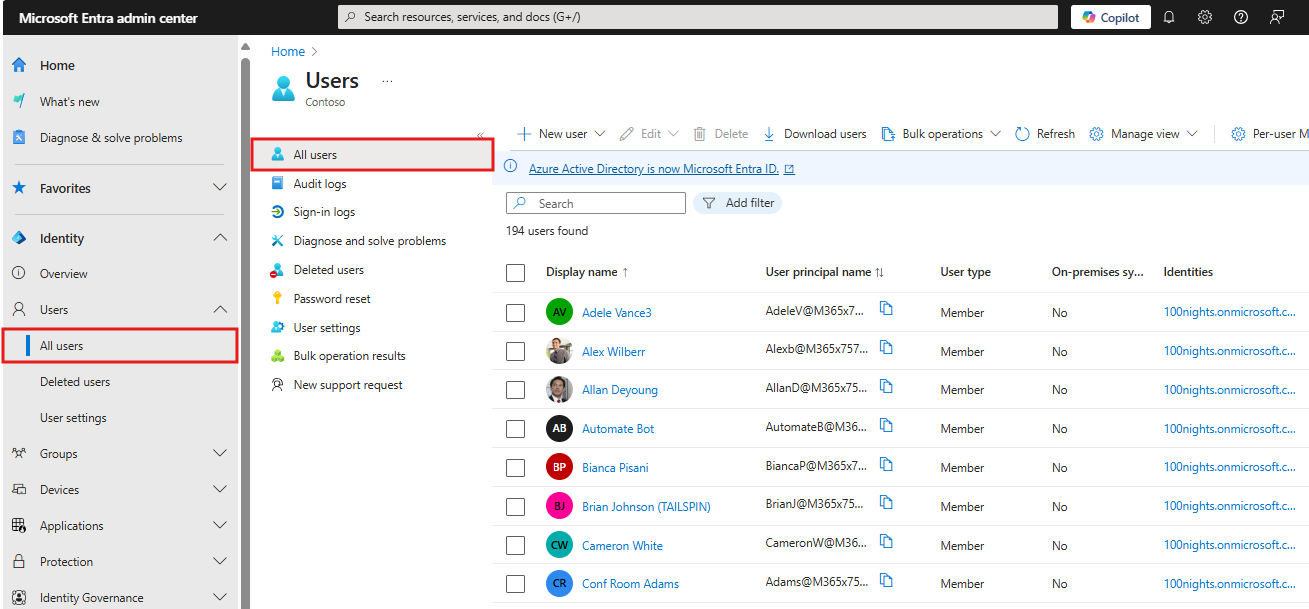
In Entra, the most common user path is:
- Entra ID > Users > All users
What to look for on a user
When reviewing a user, capture these basics:
- display name
- user principal name
- whether the account is a member or guest
- licenses present or missing
- groups that look relevant
- any obvious workload clues, such as mailbox or authentication-related information
User investigation mindset
When someone says, “This user can’t do X,” do not jump straight to the app.
Instead, start with this sequence:
- confirm the user object exists
- confirm the user is the correct person and correct account
- confirm license presence
- confirm whether the problem belongs to identity, email, Teams, or SharePoint
User details view
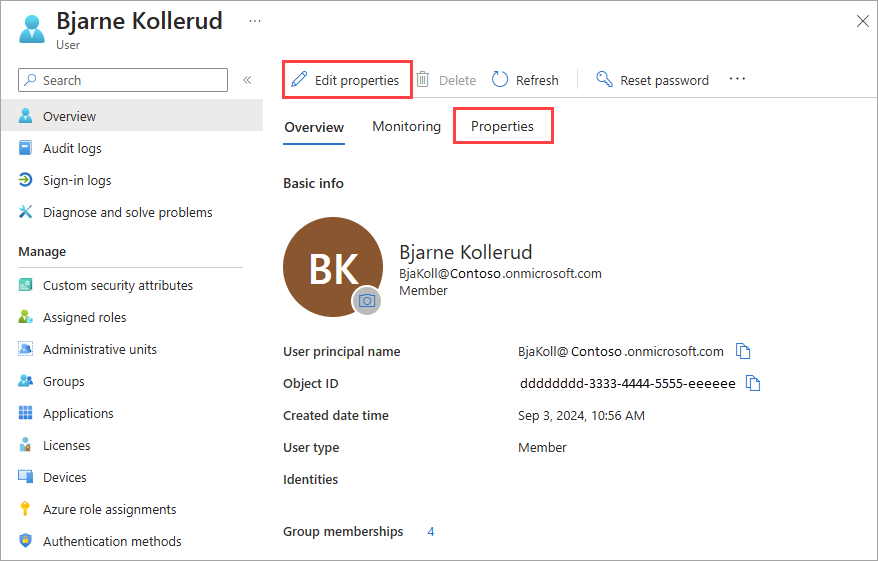
This screen is useful because it reminds you that a user is not just a name. The user object connects to:
- groups
- licenses
- authentication methods
- devices
- applications
- role assignments
Routine changes you should understand conceptually
Even though you are not performing them with Global Reader, you should know where routine user changes happen.
Add a user
Microsoft documents adding a user from:
- Microsoft 365 admin center > Users > Active users > Add a user
Assign or unassign a license
Microsoft documents license work from either:
- Billing > Licenses
- or Users > Active users > select user > Licenses and Apps
Change apps and services inside a license
This is also handled in the license-management flow. A user may have a product assigned, but a specific service inside the product may be disabled.
Common beginner mistakes
Mistake 1: assuming “has Microsoft 365” means “has every app”
A license bundle can include multiple services, and some services can be toggled off.
Mistake 2: assuming every user should look the same
Different departments or roles may have different license plans and different group memberships.
Mistake 3: assuming the user object alone proves the service should work
A user can exist but still have a licensing issue.
Practical workflow: user can’t access Teams
Your read-only workflow should be:
- find the user
- review the assigned licenses
- note whether the license likely includes Teams
- note whether the issue probably belongs in Teams admin center next
- escalate if a change is needed
Practical workflow: new employee needs access
With Global Reader, you cannot complete the new-hire setup, but you can still prepare a useful pre-check:
- verify whether the account already exists
- verify whether a license is already assigned
- verify whether expected groups exist
- tell the write-capable admin exactly what appears missing
Daily assignment
Choose two real or test users and create a short comparison note:
- user display name
- user principal name
- member or guest
- license status as visible to you
- which workload they appear ready to use
- what you would verify next if the user reported a problem
Quiz
- What is the most common page in the Microsoft 365 admin center for reviewing users?
- What is the most common page in Entra for reviewing users?
- Name two places from which Microsoft documents license assignment work.
- Can a user have a product assigned but still have a specific service inside that product turned off?
- If a new user needs to be created and you only have Global Reader, what should your role be in the process?
End-of-day reflection prompt
Write one paragraph explaining the difference between:
- a user object
- a license assignment
- a workload-specific issue
Source notes
- Add users in Microsoft 365: https://learn.microsoft.com/en-us/microsoft-365/admin/add-users/add-users?view=o365-worldwide
- Assign or unassign licenses in Microsoft 365 admin center: https://learn.microsoft.com/en-us/microsoft-365/admin/manage/assign-licenses-to-users?view=o365-worldwide
- Manage user profile information in Entra: https://learn.microsoft.com/en-us/entra/fundamentals/how-to-manage-user-profile-info